How does a job application tracker work?
How does a job application tracker work? See what it records, how applications get in, how statuses and counts work, and what a tracker cannot tell you.
Written by Nancy Osazee, Founder of CareerPilot.
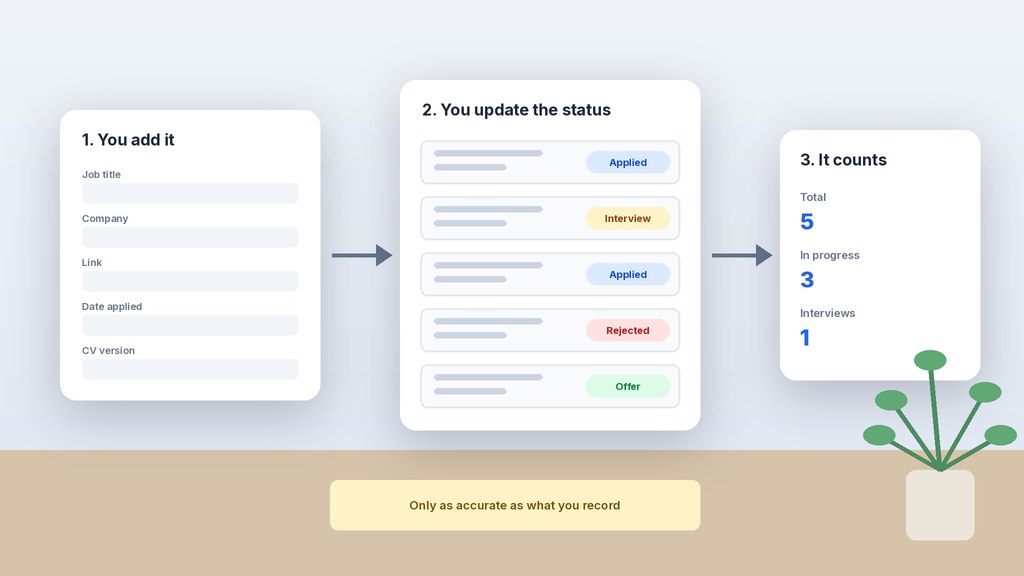
A job application tracker works by keeping one record for each job you apply for, then letting you update that record as things change. You add the basics, such as the job title, employer, link and date, either by typing them in or with a tool that saves them for you. You then move the application through statuses like applied, interview, offer or rejected, and add notes as you go. Some trackers turn those records into simple counts. What a tracker cannot do is see inside an employer's hiring system, so it is only ever as accurate as what you record.
- A tracker stores one record per application and lets you update its status and notes over time.
- Applications get in by manual entry, a browser extension, or a spreadsheet you maintain yourself, depending on the tool.
- Summary figures such as interview rate are calculated from your own entries, not from employer data.
- No tracker can see an employer's internal decisions, so record what you actually submitted and keep it up to date.
Why this matters
When you are sending several applications a week, details blur quickly. A recruiter phones about a role and you cannot remember which CV you sent, what the salary was or whether you already followed up. A tracker exists to answer those questions in seconds.
Understanding how a tracker works also helps you choose one and use it properly. If you want a comparison of specific tools, read the best job application trackers in 2026. This guide explains the mechanics underneath any of them.
How does a job application tracker work?
Almost every tracker, from a spreadsheet to a dedicated app, follows the same basic loop:
- Capture. You create a record when you apply, with the details you will need later.
- Update. You change the status as the application moves forward or stops.
- Note. You add what happened and what you need to do next.
- Review. You look across your records to see what is open, what needs a follow-up and where you are getting responses.
The differences between tools are mostly about how much of that loop they make easier, and how much they leave to you.
What a tracker records
A useful record answers the questions you will be asked, or ask yourself, weeks later. Most trackers include some or all of these fields:
| Field | Why it helps |
|---|---|
| Job title and employer | Identifies the role when a recruiter calls |
| Link to the advert | Lets you reread the requirements before an interview, if the advert is still online |
| Date applied | Tells you how long it has been and when a follow-up is reasonable |
| Status | Shows at a glance what is open, progressing or closed |
| Outcome | Records how it ended: offer, rejection or no reply |
| Notes | Holds contacts, interview dates, questions asked and next steps |
| CV or cover letter version | Reminds you exactly what the employer is holding |
Adverts are often removed once a role closes, so it is worth saving a copy of the job description somewhere you control. Your tracker link may not work later.
How applications get into a tracker
Manual entry
You type in each application yourself. It takes a minute per role, but it means you only record applications you actually submitted, and you decide what goes in every field.
Browser extensions
Some trackers offer a browser extension that saves a job's details from a job board page in one click. That is quicker, but saving a job is not the same as applying for it. You still need to mark which ones you actually applied for and check the captured details are right.
Spreadsheets
A spreadsheet works as a tracker if you set up the columns yourself. You get full control over the fields, but every update, formula and reminder is yours to build and maintain.
How statuses and stages work
A status is a label that tells you where an application stands. Some tools show statuses as a simple list; others use a board with columns you drag cards between. Common stages include:
- Saved or interested: a role you might apply for.
- Applied: you have submitted the application.
- Interview: you have been invited to a call, test or interview.
- Offer: you have received an offer.
- Rejected or closed: the employer said no, you withdrew, or you decided to stop waiting.
The key point is that you change the status. Most trackers have no way of knowing what the employer has decided. If you do not update a record, it will look open forever.
How counts and rates are worked out
Many trackers show figures such as total applications, how many are in progress, and an interview or offer rate. These are calculated from your own records. For example, an interview rate is usually the number of applications you marked as reaching interview, divided by the number you applied for.
That makes the numbers useful for spotting patterns in your own search, such as one type of role getting more replies than another. It also means they are not a forecast and not a measure of the job market. If your records are incomplete, the figures will be too.
What a job application tracker cannot do
- It cannot see inside an employer's applicant tracking system or tell you whether someone has read your CV.
- It cannot confirm whether a role is still open or has been filled.
- It cannot guarantee interviews or offers; it only organises your own information.
- It cannot keep itself accurate; out-of-date statuses make every count misleading.
How to use a tracker well
- Add the record when you apply, not at the end of the week.
- Record the version you sent, including the CV file name and any cover letter.
- Set your own follow-up date in the notes or your calendar, if your tracker does not send reminders.
- Close records honestly. If you have heard nothing after a reasonable period, mark it closed so your open list stays real.
- Review once a week. Look for patterns in which roles and sources get replies, then adjust where you apply.
How the CareerPilot job tracker works
The CareerPilot job tracker is a simple list rather than a board. You add each application yourself with the job title, company, link, a status (in progress or completed) and an outcome (pending, accepted or rejected), and you can write notes on each one. The list is saved to your account, and a new application is also added to your career timeline.
The page shows how many applications you have, how many are in progress, your offer rate, and an interview rate based on the word interview in your notes. It does not import roles for you and it does not send follow-up reminders. The Free plan stores up to 10 applications, Career Focus stores 50 and Career Growth stores 100.
A tracker is most useful when the applications in it are worth tracking. Start from trusted live jobs listed from employer sites, check your CV against a role with the ATS scanner, and if an advert you found elsewhere looks stale, run it through the free ghost job detector before you apply.
FAQ
What is a job application tracker?
It is a tool for keeping a record of each job you apply for, including the employer, link, date, status and notes, so you can see what is open and what needs a follow-up.
Does a job application tracker connect to employers' systems?
Generally no. A tracker holds your own records. Unless a tool clearly explains a specific connection, it cannot see an employer's internal decisions or tell you whether your CV was read.
Is a spreadsheet good enough as a job application tracker?
It can be. A spreadsheet gives you full control over the fields, but you build and maintain everything yourself, including any reminders. A dedicated tracker saves set-up time and keeps the structure consistent.
How does a tracker work out my interview rate?
It divides the applications you marked as reaching interview by the applications you recorded. The figure depends entirely on how complete and accurate your entries are.
Do job application trackers send reminders?
Some do and some do not. The CareerPilot job tracker does not send follow-up reminders, so add your own follow-up dates in your notes or calendar.
How many applications should I track?
Track every application you actually submit. The number that matters more is how many of them are roles you genuinely fit, because fewer, better-targeted applications are easier to follow up properly.
One last thing
A job application tracker is a simple idea: one honest record per application, kept up to date. It will not get you hired on its own, but it stops good opportunities slipping through the cracks and shows you which parts of your search are working. Fewer, better applications: live employer listings matched to your real CV.
Related guides
🚀 Ready to transform your UK job search?
Try CareerPilot's free or — built specifically for the UK market.