How long does an online CV check take?
On CareerPilot: CV builder and ATS check
How long does an online CV check take? What happens during an automated check, why fixing your CV takes longer than the scan, and how to plan your time.
Written by Nancy Osazee, Founder of CareerPilot.
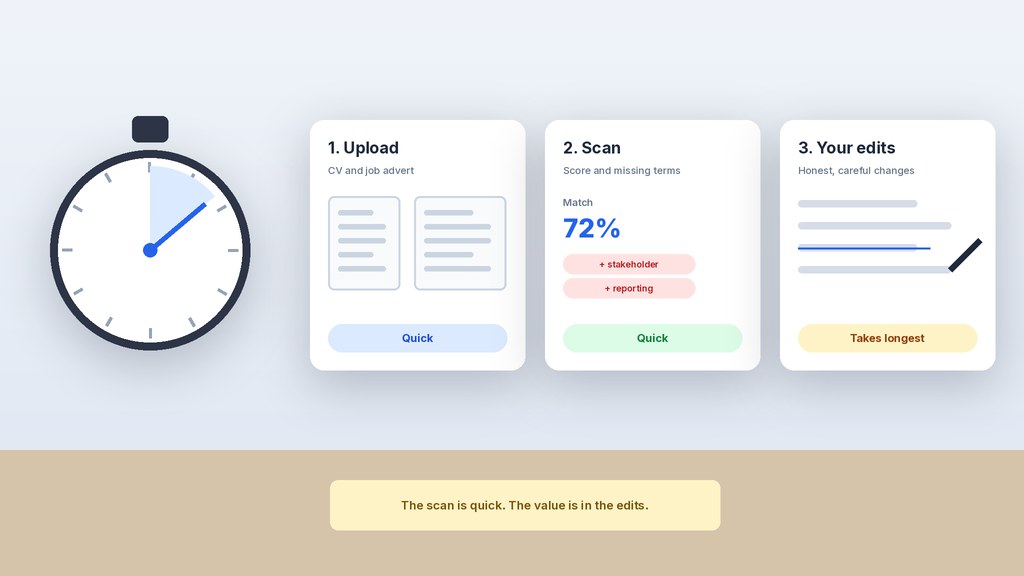
The automated part of an online CV check is usually quick. Once you upload your CV and, for a job-specific check, paste the advert, most tools return a result within minutes rather than hours. The scan is rarely what takes the time. Getting your CV ready to upload, reading the feedback properly and making the changes it points to are the parts that need real attention, and how long they take depends on how much needs fixing. Human CV review services work differently again, because a person has to read your CV, so check the turnaround each service states. This guide breaks down each stage so you can plan your time and make the check worth it.
- The automated scan in an online CV checker is normally quick; the edits afterwards take longer.
- A job-specific check, where you paste the advert, is more useful than a general one and only adds the time it takes to copy the description.
- Human review services take longer because a person reads your CV; check the turnaround each provider states.
- Plan time to read the feedback and make careful changes, then re-check only if you changed a lot.
Why this matters
When you are applying for several roles a week, time is the thing you are shortest of. It is easy to think of a CV check as one more step that slows you down. In practice, a short check before a strong-fit application can save you from sending a CV that does not show what the employer asked for.
Knowing where the time actually goes also helps you avoid the opposite trap: running the same CV through a checker again and again, chasing a higher number, instead of applying. The aim is a clearer CV for a role you genuinely want, not a perfect score.
How long does an online CV check take?
It helps to split a CV check into stages, because each one takes a different kind of effort.
| Stage | What happens | What affects the time |
|---|---|---|
| Preparing | You find your latest CV and, for a job-specific check, copy the full advert | Whether your CV is up to date and saved as a PDF or Word file |
| Uploading | The tool reads the text from your file | File format and layout; complex designs can be harder to read |
| Automated scan | The tool compares your CV with the advert or with general guidelines | The tool itself; most show progress while they work |
| Reading the feedback | You go through the score, missing terms and suggestions | How detailed the report is and how carefully you read it |
| Making changes | You edit your CV where the feedback is fair and accurate | How many changes are needed and how well you know your own evidence |
The scan is usually the shortest stage. Reading and editing take the most time, and they are also where the value is.
What happens during an automated CV check
Most online checkers first pull the text out of your file. If the layout uses tables, text boxes or columns, some text may come out in the wrong order or not at all, which is one reason a check can flag problems you cannot see on screen. The tool then looks at structure, such as headings and dates, and, if you pasted an advert, compares the skills and terms in the job description with those in your CV. For more on how that comparison works, read how an ATS scores your CV.
A general check that does not use an advert can tell you about layout and common issues. A job-specific check is usually more useful, because it shows what this particular employer asked for that your CV does not yet show.
Automated check or human review?
| Online CV checker | Human CV review | |
|---|---|---|
| How it works | Software reads your CV and returns a report | A person reads your CV and writes feedback |
| Turnaround | Usually minutes for the scan itself | Depends on the service; check the turnaround it states |
| Best for | Checking a CV against a specific advert before you apply | Bigger questions such as a career change, gaps or overall positioning |
| Limits | Cannot judge context the way a person can | Depends on the reviewer's experience and the time they spend |
Neither is a guarantee of interviews. If you want to understand how far you can rely on an automated result, read whether a free CV checker is accurate enough to trust.
Why fixing your CV takes longer than checking it
A checker might tell you that a skill from the advert is missing. Adding the word is quick. Adding it honestly, with a line of evidence showing where and how you used that skill, takes thought. That is the right way to do it: a recruiter or interviewer may ask about anything on your CV.
- Some suggestions do not apply to you. If you do not have a skill, leave it out. Do not add terms you cannot back up.
- Layout fixes can take a while. Moving a CV out of a heavily designed template into a simple, single-column layout is worth doing once, then it helps every future check.
- Wording needs a human read. After edits, read your CV top to bottom as a recruiter would. It should still sound like you.
How to make a CV check quicker and more useful
- Keep a clean master CV. A simple layout saved as a Word file or text-based PDF is easier for tools to read and quicker to edit.
- Check against a real advert. Paste the full job description, including the person specification, for a role you actually plan to apply for.
- Read the whole report before editing. Group the suggestions into layout, missing evidence and wording, then fix them in that order.
- Change only what is true and relevant. Skip suggestions that do not fit your experience.
- Re-check once if you made big changes. There is no need to rescan after every small edit.
- Save the version you send. Name the file after the role so you know which CV each employer has.
How long the CareerPilot ATS scanner takes
With the CareerPilot ATS scanner, you upload your CV as a PDF or Word file, or paste the text, and paste the job description. The feature page gives an average scan time of three minutes. The result shows a match score for that advert, missing keywords and suggested changes, and the ATS scanner also prepares a reworded version of your CV that you can preview and download as a PDF or Word file.
Read any reworded version carefully before you use it, and remove anything that is not accurate for you. The score is a guide to editing, not a promise of an interview. Free accounts include five CV scans a month, so it makes sense to save them for roles you are ready to apply for.
The quickest CV check is the one you only need to run for a good-fit role. Start from trusted live jobs listed from employer sites, check your CV against the advert, then record where you applied in the job tracker.
FAQ
How long does an online CV check take?
The automated scan itself is usually quick, often a matter of minutes. Preparing your CV, reading the feedback and making careful changes take longer and depend on how much needs fixing.
Is an instant CV check accurate?
It can be a useful guide, especially when you check against a specific advert. It cannot judge context the way a person can, so treat the result as a list of things to review, not a final verdict.
How long does a human CV review take?
It depends on the service, because a person has to read your CV and write feedback. Check the turnaround the provider states before you book.
Should I check my CV for every job application?
It is worth checking for roles you genuinely want and fit well, especially when the advert lists specific skills. For very similar roles, one careful check and small edits may be enough.
Why does my CV check take longer than expected?
Large files, complex layouts or a busy service can slow things down. A simple, text-based CV is usually quicker to process and easier for tools to read.
Does a high CV check score mean I will get an interview?
No. A score shows how well your CV matches what the tool looked for. Employers make decisions based on many factors, and no checker can guarantee an interview.
One last thing
An online CV check is rarely the slow part of applying. The scan is quick; the value comes from the time you spend reading the feedback and making honest changes. Use it on roles you genuinely want, fix what is fair, and move on to applying. Fewer, better applications: live employer listings matched to your real CV.
Related guides
🚀 Ready to transform your UK job search?
Try CareerPilot's free or — built specifically for the UK market.