Can a job tracker stop duplicate applications?
Can a job tracker stop duplicate applications? See how a job application tracker helps you spot repeats, and what CareerPilot cannot automate.
Written by Nancy Osazee, Founder of CareerPilot.
Applying twice for the same role is easy when your search is spread across inboxes, browser tabs and memory. A job application tracker will not block a second click for you, but it can make duplicates obvious before you waste another evening on the same form. This guide explains what a tracker can and cannot do, how CareerPilot's list works, and a simple habit that cuts repeats without inventing features the tool does not have. For how trackers work in general, see how a job application tracker works.
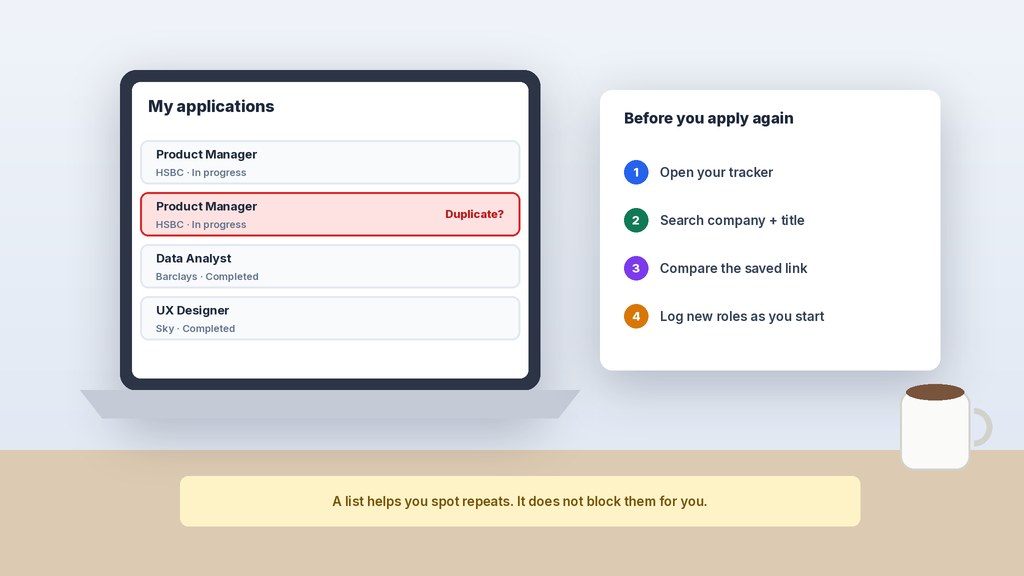
- A job application tracker does not automatically detect or block duplicate applications. It helps you spot them because every role you logged sits in one list.
- CareerPilot's tracker is a manual list: you add title, company, link, status and outcome. There is no drag board, no auto-import from the jobs board, and no follow-up reminders.
- Before you apply, search your list by company or title. If the same role is already there, stop and check the link and notes before you fill another form.
- Free stores 10 applications, Career Focus 50, and Career Growth 100. Counts such as offer rate come from the statuses and notes you enter, not from predictions.
Why this matters
Duplicate applications waste time you could spend on a better match. They can also look careless if a recruiter sees two near-identical submissions. Most people do not mean to apply twice. They forget a role they started last week, reopen the same advert from a different site, or lose track when several applications sit unfinished.
A tracker will not replace judgment. It gives you one place to look so you can catch repeats yourself before you hit submit again.
Can a job tracker stop duplicate applications?
It can help you stop them, but it does not stop them for you. Most simple trackers, including CareerPilot's, do not scan the open web, match employer portals, or refuse a second entry for the same job. What they do is keep every application you recorded in one list, so you can see whether you already started or finished that role.
If you never add a role to the list, the tracker cannot warn you about it. The value comes from logging each application when you start it, then checking the list before you start another.
How duplicates usually happen
- The same role on two sites. An employer careers page and a board may both show the vacancy. Without a shared list, it is easy to treat them as two jobs.
- Unfinished applications. You began a form, got distracted, and later apply again thinking you never finished.
- Similar titles at one company. Two adverts can look different until you compare the link, location and closing date.
- Shared devices or memory. Relying on "I think I applied" fails when you are applying to many roles in a short spell.
- No notes. Without a status or note, you cannot tell whether a listed role was withdrawn, rejected or still open.
What a tracker can do for duplicates
- One list to scan. Company names and job titles sit together, so repeats stand out when you search or scroll.
- A saved link. Comparing the URL you saved with the advert in front of you is often the quickest check.
- Status and outcome. Seeing "in progress" or "completed" stops you from starting a second form for a role you already finished.
- Notes. A short note such as "applied via careers page 3 Nov" or "same role as Reed listing" makes later checks faster.
- A habit before apply. The real "stop" is you: open the tracker, search, then apply only if the role is new.
What a tracker cannot do
- Automatic duplicate detection. CareerPilot does not flag two entries as the same job for you.
- Block a second application. Nothing in the tracker prevents you from applying again on an employer site.
- Import from the jobs board. Trusted Live Jobs is a separate page. The tracker does not pull roles in for you.
- Reminders or a drag board. There is no kanban view and no email telling you to follow up.
- Writing your CV or cover letter. Those sit on other CareerPilot tools if you use them.
A simple anti-duplicate habit
- Before you open a new form, open your tracker. Search by company name, then by a distinctive word in the title.
- Compare the link. If a saved URL matches the advert, or points to the same employer careers page, treat it as the same role until proven otherwise.
- Check status. If it is already in progress or completed, do not start again unless you know the first attempt failed for a clear reason.
- Log new roles as you start them. Add title, company, link, status (in progress or completed) and outcome (pending, accepted or rejected) while the details are fresh.
- Add a one-line note. Source of the advert, closing date or "same as X listing" is enough.
This takes under a minute and prevents most accidental repeats. It is slower than guessing, and far quicker than filling the same form twice.
How CareerPilot's job tracker works
According to the CareerPilot job tracker page, you keep a list of the roles you have applied for. You add the company, a link, a status and the outcome. There is no board to drag and no automatic reminder. The page is clear that counts such as offer rate and interview rate come from the status and notes you enter. They are not a forecast.
Plan limits on that page are: Free stores 10 applications, Career Focus stores 50, and Career Growth stores 100. The list is saved for the signed-in user, and a new application is also added to your career timeline. Trusted Live Jobs is a different page: browse live employer listings to find roles worth applying for, then add each one you start to the tracker yourself.
If you want fewer, better applications rather than more of the same ones, match roles to your real CV first, then track each application so you can see what you have already done. Compare options in our guide to the best job application trackers, and check current plan details on the pricing page.
FAQ
Can a job tracker stop duplicate applications automatically?
Usually no. A tracker keeps your applications in one list so you can spot repeats. It does not typically block a second application on an employer site.
Does CareerPilot detect duplicate applications for me?
No. CareerPilot's tracker is a manual list. You add each role, and you check the list before you apply again.
What should I search for before I apply?
Search by company name and by a distinctive word in the job title, then compare the saved link with the advert you are about to open.
How many applications can I store on CareerPilot?
According to the job tracker page, Free stores 10, Career Focus stores 50, and Career Growth stores 100.
Does the tracker import jobs from Trusted Live Jobs?
No. Trusted Live Jobs is a separate page. You add applications to the tracker yourself.
Are offer and interview rates predictions?
No. On CareerPilot they come from the statuses and notes you enter. They are counts from your list, not a forecast of results.
One last thing
A job application tracker will not slam the door on a duplicate click, but it will put every role you logged where you can see it. Check the list before you apply, log each new start, and keep short notes. Fewer, better applications: live employer listings matched to your real CV.
Related guides
🚀 Ready to transform your UK job search?
Try CareerPilot's free or — built specifically for the UK market.