Can an ATS-friendly CV still appeal to a human recruiter?
On CareerPilot: CV builder and ATS check
Can an ATS-friendly CV still appeal to a human recruiter? Yes. Learn how to keep your UK CV easy for software to read and easy for a person to shortlist.
Written by Nancy Osazee, Founder of CareerPilot.
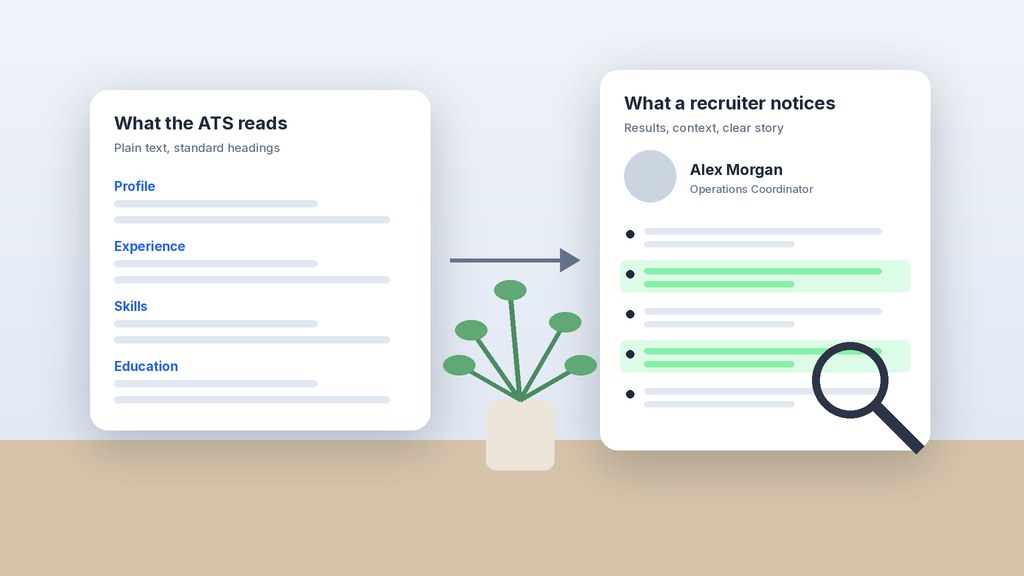
Yes. An ATS-friendly CV can appeal to a human recruiter, and the best ones do both at once. Software needs clean text, standard headings and the words the advert uses. A recruiter needs a clear story, relevant evidence and a CV that is quick to scan. Those goals overlap far more than they clash. Problems start only when people write for the software alone, with keyword lists and stuffed phrases that a person finds hard to read.
- An ATS-friendly CV and a recruiter-friendly CV want mostly the same things: clear structure, plain formatting and relevant evidence.
- Use simple layouts and standard headings so your CV reads cleanly as text.
- Mirror the advert's key terms inside real examples, not in a long list of keywords.
- Read the finished CV as a recruiter would; if it feels stuffed or vague to you, it will to them.
Why this matters
A lot of CV advice treats the applicant tracking system (ATS) as the enemy and the human reader as an afterthought. That leads to CVs that may read cleanly as text but are dull, repetitive or full of buzzwords. Other CVs go the opposite way, with heavy design, columns and graphics that look striking but do not read reliably as text.
Most applications are read by a person at some point. The aim is a CV that any system can read without errors and that a recruiter can understand in a short first scan.
Can an ATS-friendly CV still appeal to a human recruiter?
Yes, as long as "ATS-friendly" means readable and relevant rather than stuffed. The habits that help software, such as clear headings, consistent dates and the advert's own wording for your skills, also help a recruiter find what they are looking for quickly.
The habits that hurt people, such as long keyword blocks, vague phrases and repeated terms, rarely help much either. An ATS can find a skill named once in a clear sentence. A recruiter wants to see that skill used in a real situation.
What ATS-friendly actually means
- Plain, single-column layout. Text boxes, multiple columns and tables can be read out of order by some systems.
- Standard section headings. "Profile", "Experience", "Skills" and "Education" are easy for software and people to recognise.
- Text, not images. Skills shown as icons, charts or logos may be invisible when the CV is read as text.
- Contact details in the body. Some systems skip page headers and footers, so keep your name, email and phone number in the main text.
- Consistent dates and job titles. Use one date format throughout and give each role a clear title, employer and dates.
- The file type the employer asks for. If the advert does not say, a Word document or a text-based PDF is a common safe choice.
What a human recruiter looks for in the first read
A recruiter usually starts with a quick scan before deciding whether to read in detail. In that first look they tend to check:
- Whether your recent job titles and experience relate to the role.
- Whether the essential criteria from the advert are visible without hunting.
- Evidence of what you achieved, not only the duties you held.
- A clear, believable career story, including gaps or changes explained briefly.
- A tidy layout with enough white space to read comfortably.
None of that conflicts with ATS-friendly formatting. A plain layout with clear headings actually makes the scan faster.
Where the two can pull apart
| Writing only for the ATS | Writing for both |
|---|---|
| A long block of keywords under "Skills" | A short skills list, with each key skill also shown in an example |
| The same term repeated in every bullet | The term used where it is true, in plain sentences |
| Generic duty lists copied from job descriptions | Specific actions, tools and outcomes from your own work |
| A vague profile stuffed with buzzwords | Two or three lines on who you are, what you do and what you want next |
| Hidden or white text to add keywords | Nothing hidden; every word is one you are happy to discuss |
How to write a CV that works for both
1. Start from the advert, not a template
Highlight the essential criteria and the words the employer uses for them. If the advert says "customer service" and your CV says "client care", use the advert's term where it honestly describes your work.
2. Write a short, specific profile
Two to four lines are enough. Say what you do, the setting you do it in and the kind of role you are applying for. This is often the first thing a recruiter reads, so it should match the job in front of them.
3. Turn duties into evidence
For each recent role, lead with what you did and what changed because of it. A bullet such as "Handled customer complaints" becomes clearer as "Resolved customer complaints by phone and email using Zendesk, and wrote the team's refund guidance". The skill is still named for the ATS; the recruiter now sees how you used it. Only use figures you can stand behind.
4. Keep the layout plain but readable
Use one column, a clear font, consistent spacing and bold for job titles. In the UK, two sides of A4 is a common guide for experienced candidates, and one page can work well for school leavers and recent graduates.
5. Check it both ways before you send
Run an ATS check against the advert to catch reading problems and missing terms. Then read the CV as a recruiter would, top to bottom, in under a minute. If any line feels padded, cut it.
Checking both sides with CareerPilot
The CareerPilot ATS scanner lets you paste a job description, upload your CV in PDF or Word and see a match score with missing keywords for that advert. Free accounts include five CV scans a month. The score is a guide to editing, not a promise of an interview, so use it to find gaps, then decide which ones you can honestly fill.
If you also need a cover letter, the CareerPilot cover letter generator drafts one from the job description in a tone you choose, and you can edit it before exporting. Read it through and make sure every sentence sounds like you.
A recruiter-friendly CV works best on a role you genuinely fit. Browsing trusted live jobs from employer sites first helps you send fewer, better applications instead of tailoring for adverts that were never right.
FAQ
Can an ATS-friendly CV still look professional?
Yes. Clean typography, consistent spacing, bold job titles and clear headings look professional and read well as text. You do not need graphics or columns to stand out; relevant evidence does more.
Should I put keywords in a separate section?
A short skills section is fine, but do not rely on it alone. Show the most important skills inside your experience too, so a recruiter can see where and how you used them.
Do recruiters dislike ATS-friendly CVs?
Recruiters dislike CVs that are stuffed, vague or hard to scan, whatever the reason. A plain, well-organised CV with specific examples is usually easier for them to read, not harder.
Is a two-column CV bad for ATS?
Not always, but some systems read columns out of order or merge them. A single-column layout removes that risk and is just as easy for a person to read.
Can I use a PDF for an ATS-friendly CV?
Often yes, if it is a text-based PDF rather than a scanned image. Always follow the file type the employer asks for. If unsure, a Word document is a widely accepted option.
How do I know if my CV appeals to a human?
Ask someone outside your field to read the top half of your first page for thirty seconds, then tell you what job you do and one thing you achieved. If they cannot, simplify and add specific evidence.
One last thing
You do not have to choose between software and people. Write a plain, well-structured CV that uses the employer's language inside real examples, check it against the advert, then read it as a recruiter would. Fewer, better applications: live employer listings matched to your real CV.
Related guides
🚀 Ready to transform your UK job search?
Try CareerPilot's free or — built specifically for the UK market.